

A potential customer messages your business on Instagram, and it never reaches your main inbox. It is not lost; it is sitting in message requests, a separate holding area for messages from people you do not follow, and for a business, it is exactly where new-customer messages land. If you do not know it exists or cannot find it, you are missing conversations that could have become sales. The fix is simple once you know where to look, and it starts with understanding why Instagram routes messages this way in the first place.
Key Takeaways
- Message requests are a separate inbox for people you do not follow.
- For a business, that is where most new-customer messages actually arrive.
- Requests can be split across primary, general, and hidden folders.
- The hidden requests folder holds messages flagged as spam, including real ones caught by mistake.
- A simple daily checking routine is what stops genuine inquiries from slipping through.
Where Do Instagram Message Requests Actually Live?
Message requests live in a separate area of your direct messages, reached by opening your inbox and tapping the requests link near the top. When someone you do not follow messages you, Instagram routes it there rather than to your main inbox, and the message waits until you accept it, at which point the conversation moves into your regular inbox.
This matters enormously for a business, because the people most likely to message you- new prospects, people who just found you, customers you have not interacted with before- are exactly the people you do not follow. That means your most valuable incoming messages default to the one place a busy account is least likely to be looking, which is why so many businesses discover a backlog the first time they open it, and every unanswered one is a missed chance at turning Instagram engagement into website visitors.
Why Do Messages End Up in Requests?
Messages end up in requests because the system is designed as a filter, separating messages from your established contacts from messages from strangers. For a personal account, this keeps unwanted messages out of the main inbox, and for a business, it quietly works against you, since the strangers it is filtering are your potential customers.
Once you know that new-customer messages land in requests by design, checking the folder becomes an obvious habit rather than an afterthought. Businesses that actively use direct messages for sales treat the requests folder as a primary channel, which is the foundation of how brands generate leads through Instagram DMs in the first place.
Requests Are Where Strangers Land
The main inbox is for people you already know. Message requests are for everyone else, which for a business means almost every new prospect.
Why Are Requests Split Across Folders?
Requests are split across folders because Instagram sorts incoming messages into categories, so depending on your setup, a message can sit in a primary folder, a general folder, or another category rather than a single list. A quick check of one folder can leave you thinking there is nothing there when a message is waiting one tab over.
This is a common reason businesses believe their message requests are empty when they are not. Checking all the folders rather than just the first one you see takes only a moment once you know to look, and it closes one of the easiest gaps through which a genuine inquiry goes unseen.
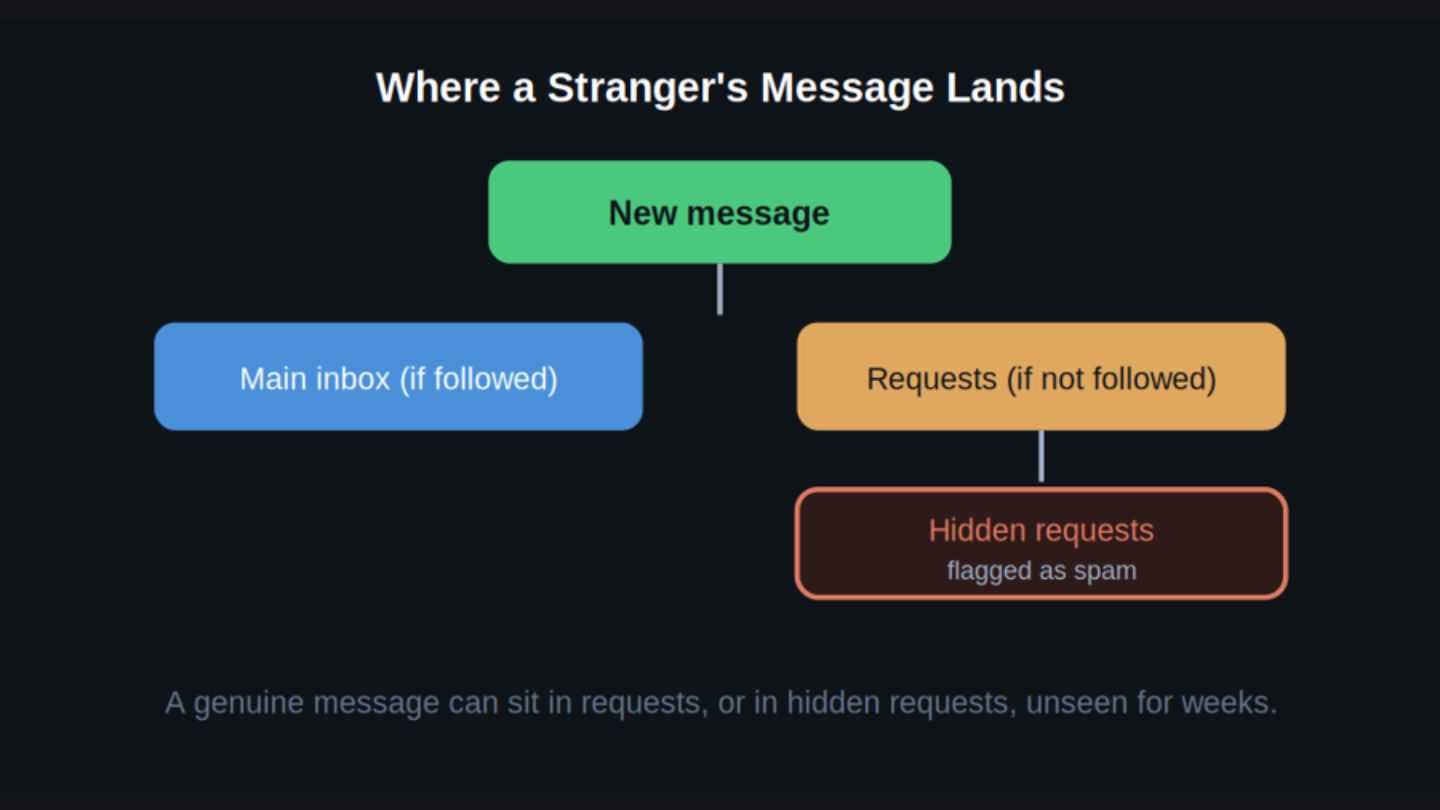
Messages from people you do not follow bypass the main inbox, and some are filtered further into hidden requests.
Why Do Some Requests Seem to Disappear?
Some requests seem to disappear because Instagram has a hidden requests area that holds messages flagged as potential spam, and these do not appear in your normal requests list at all. A message someone swears they sent can seem to have vanished when it was simply filtered, not deleted.
The catch is that the filtering is not perfect, and genuine messages from real potential customers sometimes get flagged and routed here by mistake. A legitimate inquiry can sit in hidden requests indefinitely, never seen, which is exactly why that folder is worth checking for a business. You reach it from within the message requests screen, where an option for hidden requests gives access to what was filtered out. If requests have thinned out lately rather than gone missing, the cause often sits with why Instagram engagement drops and how to fix it rather than with the inbox.
How Should a Business Handle Message Requests?
A business should check message requests on a routine basis, treat every reply as a lead, and respond fast. Notifications do not reliably surface requests from non-followers, so the only dependable method is opening your direct messages and checking the requests tab, including the hidden area, on a consistent schedule. For most businesses, a daily check is enough to stop missing conversations.
Once you see a message, speed matters, because a prospect who does not hear back moves to whoever responds first. The practical workflow is to make content that invites messages, check requests daily, and answer genuinely and promptly, and getting more of those messages in the first place ties back to increasing your Instagram reach without posting more often.
Stop Missing the Messages That Matter
Instagram message requests are where messages from people you do not follow wait, which for a business means most of your new-customer inquiries. They can be split across multiple folders, and a hidden requests area holds messages flagged as spam, including genuine ones caught by mistake. The fix is knowing all these places exist and checking them on a simple routine rather than trusting notifications to surface everything. Treat requests as a real inbox, scan the hidden folder occasionally, and you stop losing the conversations that could have become customers.
At The Ocean Marketing, we help businesses get real results from Social Media Marketing, including turning the inquiries you already receive into actual business. Whether you need a direct-message process set up, your profile made more reachable, or a free SEO audit to see how your wider presence performs, our team can help. Contact us and let's make sure no genuine inquiry slips through.
Frequently Asked Questions
Why can't I see a message someone says they sent me on Instagram?
It is most likely in your message requests folder, which holds messages from people you do not follow, or in the hidden requests area for messages flagged as possible spam. Check both, since genuine messages sometimes get filtered into hidden requests by mistake.
Do I get a notification for message requests?
Not reliably. Notifications for requests from people you do not follow are inconsistent, which is why messages sit there unseen. The dependable approach is to open your direct messages and check the requests tab, including the hidden folder, on a regular schedule.
Where is the hidden requests folder on Instagram?
You reach it from within the message requests screen, where an option for hidden requests opens the messages Instagram filtered out as possible spam. Most of what is there is genuinely spam, and the occasional real inquiry caught by mistake is exactly why it is worth a periodic look.