
You curated the perfect collection of memories. You picked the best cover image, gave it a witty title, and pinned it to the top of your profile. Three months later, one question remains: who is actually looking at it?
The short answer is that your account settings decide. On a public account, anyone who visits your profile can watch your Highlights, including people who don't follow you. On a private account, only approved followers can. Close Friends Stories and your “Hide story from” list narrow that audience further.
Highlights sit between a 24-hour Story and a permanent grid post, which is why their privacy rules confuse so many people. Whether you keep a personal archive of family trips or run a business portfolio, this guide covers who can access your Highlights in 2026, what you can and can't see about viewers, and how to control your audience without locking down your whole account.
Key Takeaways
- Your account type controls access. Public profile: anyone can see your Highlights. Private profile: only approved followers.
- Close Friends overrides public access. A Highlight made from Close Friends Stories is only visible to people on that list, even on a public account.
- Viewer names are available for 48 hours. You can see who viewed a Story, including through its Highlight, for 48 hours after the Story was first posted. Adding it to a Highlight doesn't reset that clock.
- You can hide Highlights from specific people without blocking them. The “Hide story from” setting removes your Stories and Highlights from their view while leaving your grid posts visible.
- Hiding works both ways. If someone has hidden their Story from you, their Highlights are hidden from you too.
- Third-party viewer apps can't be trusted. Apps that claim to show long-term Highlight viewers break Instagram's terms and put your login at risk.
What Are Instagram Highlights, Really?
To understand visibility, start with what the feature actually is. Instagram Highlights are archived Stories that you have chosen to display permanently. They sit at the top of your profile and work like a trailer for your life or brand.
Because Highlights start out as Stories, they keep most Story rules, including the audience you chose when you posted. What they drop is the 24-hour expiry. The content stays, but the data attached to it, especially the list of viewers, changes over time. Many people treat Highlights like grid posts and assume the privacy rules are identical. They are close, but the differences matter.
Are Highlights on Instagram Public?
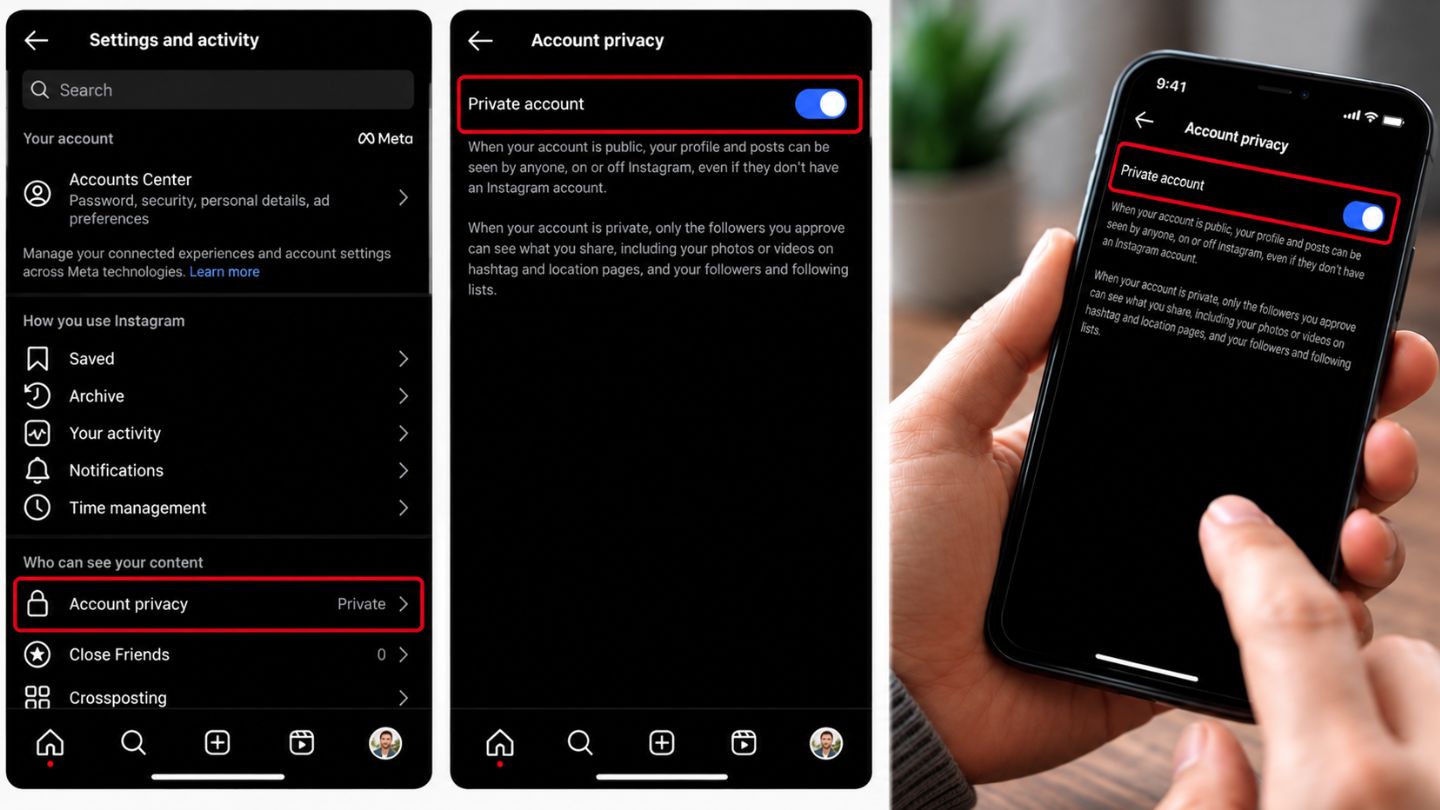
It depends entirely on your main account setting. In 2026, Instagram still uses a two-option approach to profile visibility: Public or Private. You'll find it under Settings and activity → Account privacy.
Public profiles
If your account is public, your Highlights are open to anyone who lands on your profile. That includes:
- Your followers
- Instagram users who don't follow you
- People who found your profile through a shared link, search or the Explore page
In practice, if a stranger can see your bio and grid, they can tap through your Highlights. They don't need to follow you first.
For professional accounts, visibility ties directly to performance. Understanding what accounts reached mean on Instagram helps here, because reach counts the unique users who saw your content. Highlights don't give you long-term viewer names, but overall reach still shows how discoverable your profile content is.
Private profiles
On a private account, your Highlights are visible only to followers you have approved. A stranger who lands on your profile sees your username, profile photo and bio, but can't open your Highlights. To watch them, they have to send a follow request and you have to accept it.
Quick reference: who can see what
| Situation | Who can see the Highlight |
|---|---|
| Public account, regular Story | Anyone who visits your profile, except people you've hidden your Story from or blocked |
| Private account, regular Story | Approved followers, except people you've hidden your Story from |
| Close Friends Story (any account type) | Only people on your Close Friends list |
| Someone on your “Hide story from” list | No Stories or Highlights |
| Someone you blocked | Nothing on your profile |
The “Close Friends” Exception
There is one major exception. Even on a public profile, you can build Highlights from Close Friends Stories. If you post a Story to your Close Friends list and then save it to a Highlight, only people on that list will see it. They'll notice a green ring around the Story. To everyone else visiting your profile, that Highlight doesn't appear at all.
If a Highlight mixes regular and Close Friends Stories, each Story keeps its own audience. Someone outside your list may see the Highlight bubble but only the regular Stories inside it.
Can You See Who Views Your Highlights on Instagram?
This is the question we hear most, and the answer often disappoints people hoping to catch a “profile stalker.”
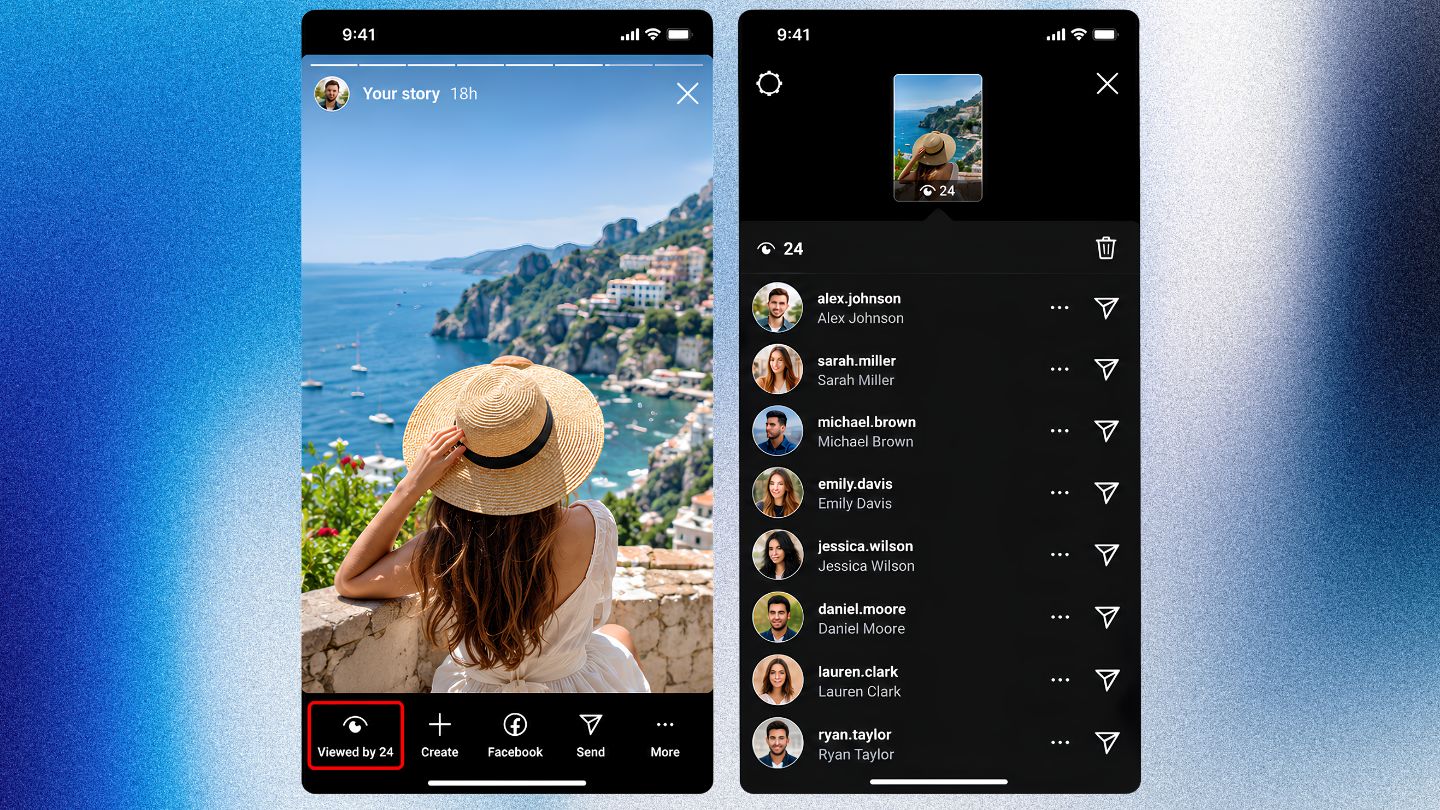
When you post a Story, you can see who viewed it. That viewer list stays available for 48 hours from the moment the Story was first posted. If you add that Story to a Highlight, anyone who watches it through the Highlight during that same window will also appear in the list. Once the 48 hours pass, the names disappear.
For example, if you post a Story on Monday at noon and add it to a Highlight that afternoon, you can see viewers until Wednesday at noon. Moving the same Story into a different Highlight on Tuesday does not start a new 48-hour period.
To check the list, open your own Highlight, go to the Story you want, and tap Activity (or swipe up). Each Story in a Highlight has its own original posting time, so a Highlight can contain one Story with a viewer list and older ones without.
In 2026, Instagram still doesn't offer a permanent viewer list for Highlights. If you have a Highlight from six months ago, you can't see who watched it today. This protects viewer privacy, but it leaves creators without long-term data.
That's where understanding Instagram likes, saves, shares, and which one matters most becomes valuable. Viewer names fade, but saves and shares still show how content performs. Brands get more from tracking those interactions than from trying to identify individual viewers.
Don't trust third-party apps. Apps that promise to “reveal your profile stalkers” or list everyone who viewed your Highlights are almost always scams or violate Instagram's Terms of Use. Giving them your login puts your account at risk. The same caution applies to tools claiming to show how to see who unfollowed you on Instagram; most ask for access you shouldn't hand over.
Can People See If You View Their Instagram Highlights?
Sometimes. If the Story you watch inside someone's Highlight was posted in the last 48 hours, your name will show in their viewer list, just as it would for a regular Story. If the Story is older than that, the owner has no named record of your view.
Either way, Instagram doesn't send a notification when someone opens a Highlight. The owner would have to check the list themselves. Keep in mind that replies, reactions and likes on a Story identify you separately from a passive view. Taking a screenshot of a Highlight doesn't alert the owner either; our guide on whether Instagram notifies when you screenshot covers every content type.
Can You Hide Highlights From Someone on Instagram?
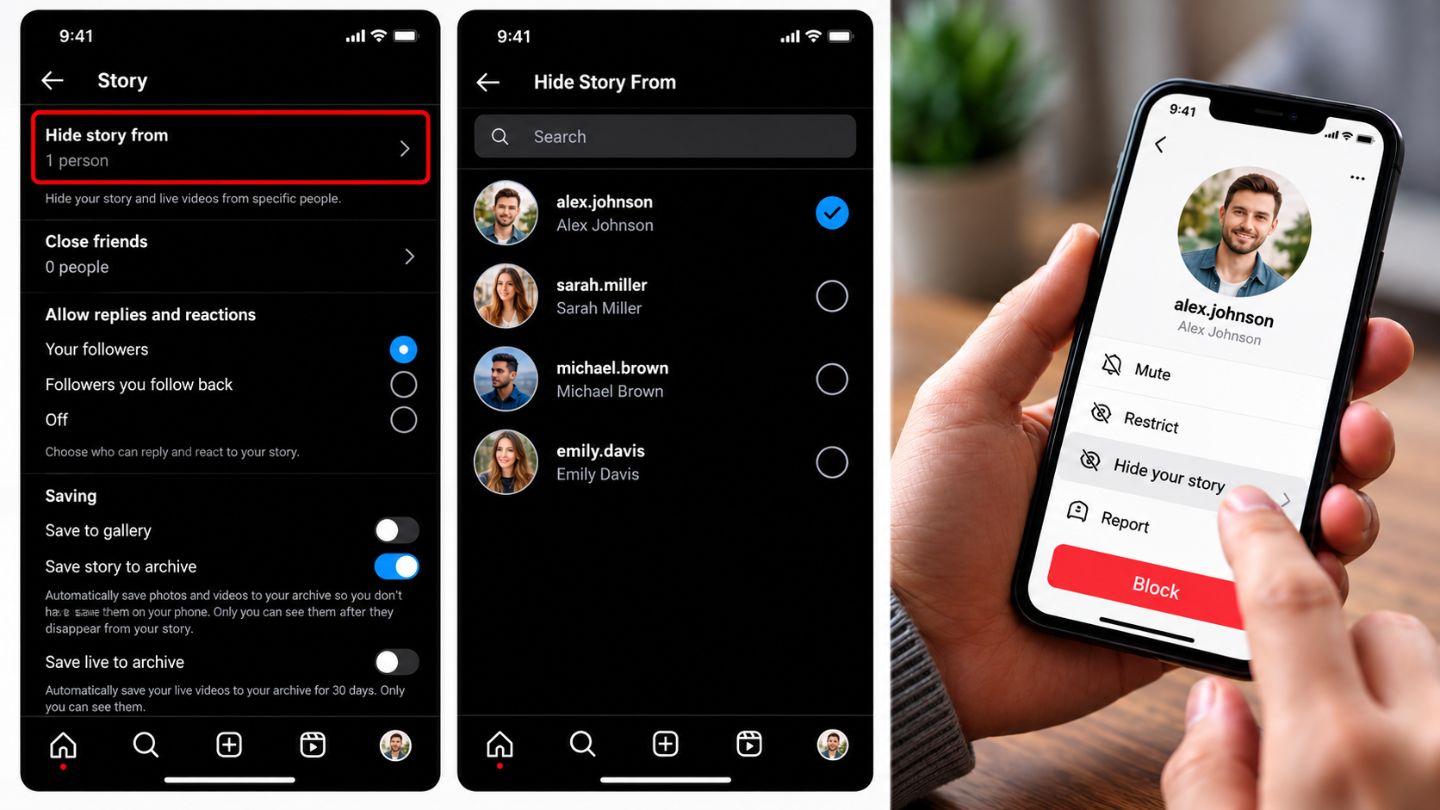
Yes. You aren't stuck with default settings, and you don't have to block anyone or make your whole account private. Here's how to adjust your Highlight privacy step by step.
Method 1: Hide your Highlights from specific people
If you want to stay public but keep a specific person, such as an ex-partner or a nosy colleague, away from your Highlights, hide your Story from them. Because Highlights are Stories, the setting covers both.
- Go to your profile and tap the menu (three lines).
- Open Settings and activity.
- Under “Who can see your content,” tap Hide story and live.
- Tap Hide story from.
- Search for the username, select it, and tap Done.
That person can still see your grid posts and send you messages, but your Stories and Highlights disappear from their view. They aren't notified. Menu labels can vary slightly between app versions.
Method 2: The Close Friends strategy
For tighter control without going private, use Close Friends as a filter.
- Go to Settings and activity → Close Friends.
- Add the people you trust.
- When you post a Story you plan to highlight, share it to Close Friends only.
- Add it to a Highlight.
You now have a VIP folder on your profile that the public can't see but your inner circle can.
Method 3: Switch to a private account
If you want every Highlight limited to people you approve, go to Settings and activity → Account privacy and turn on Private account. Existing followers keep access; new visitors have to request to follow. Professional (business or creator) accounts need to switch back to a personal account before they can go private.
Hide, Close Friends, Restrict or Block: which one?
| Control | Hides Highlights? | Hides grid posts? | Person can still message you? |
|---|---|---|---|
| Hide story from | Yes | No | Yes |
| Close Friends only | Yes, for anyone not on the list | No | Yes |
| Restrict | No | No | Messages go to requests |
| Block | Yes | Yes | No |
If Someone Hides Their Story, Can You See Their Highlights?
No. When an account hides its Story from you, its Highlights are hidden from you too. Saving a Story into a Highlight doesn't create a way around that setting.
Missing Highlights aren't proof that someone hid them from you, though. The person may have deleted or archived the Highlight, switched to a private account, posted only to Close Friends, or the app may simply not have loaded. If you can see their Highlights on another account or device but not your own, a hidden Story is the likely reason.
Can You View Highlights on a Private Account Without Following?
Not through any legitimate method. Instagram only shows a private account's Highlights to approved followers. The right route is to send a follow request. Websites and apps that promise to unlock private profiles don't have special access, and many exist to collect logins.
Why Can't I See Someone's Highlights?
Work through the simple explanations first:
- Is the account private, and are you still an approved follower?
- Did they delete, archive or rename the Highlight?
- Were the Stories shared to Close Friends only?
- Have they hidden their Story from you, restricted you or blocked you?
- Does the problem affect other profiles too? If so, update or restart the app.
Common Misconceptions About Highlight Visibility
Misinformation spreads quickly on social platforms. Here are the myths that still come up in 2026.
Myth: “If I block someone, they can still see my old Highlights.”
Fact: No. Once you block a user, they lose access to everything on your profile, including past Highlights.
Myth: “People are notified when I look at their Highlights.”
Fact: No notification is sent. However, if the Story is less than 48 hours old, your name can appear in its viewer list.
Myth: “I can see how many times one person viewed my Highlight.”
Fact: Even during the 48-hour window, Instagram doesn't show a per-person count. You see that someone looked, not how often.
Myth: “Adding an old Story to a new Highlight shows me who watches it now.”
Fact: The viewer window is tied to the Story's original posting time, not the date you added it to a Highlight.
Why This Matters for Personal and Professional Accounts
Understanding these mechanics isn't about vanity. It's about strategy and safety.
For personal users
Highlights often contain sensitive details: places you go regularly, family members, personal milestones. On a public profile, that archive is open to anyone on the internet, which matters for both physical and digital safety. Reviewing your “Hide story from” and Close Friends lists every few months keeps your boundaries current.
For professional brands
For businesses, Highlights work like a sales funnel, so most should stay public: product categories, FAQs, reviews, pricing, opening hours. The Close Friends mechanic also allows exclusive content. You could run a “Clients only” Highlight visible to a Close Friends list made up of paying customers, turning a privacy feature into a loyalty tool.
Knowing you can't track long-term views also resets your analytics expectations. Judge a Highlight by the direct messages, link clicks and inquiries it produces, not by a view count that loses its names after two days.
Final Thoughts
Instagram Highlights may feel permanent, but who sees them is controlled entirely by your settings. Public accounts let anyone view Highlights, private accounts limit them to approved followers, and Close Friends and “Hide story from” give you finer control on top. Viewer names are available for 48 hours after a Story is posted; after that, Highlight views are anonymous. Knowing these rules lets you protect personal content, keep unwanted viewers out and plan a smarter profile for your brand.
At The Ocean Marketing, we build social media marketing strategies that balance visibility with security. Whether you need to restructure your Highlights, sharpen your audience targeting or connect your profile to wider digital goals, our team helps turn profile traffic into measurable results. You can also request a free SEO audit to find hidden opportunities across your website and social channels.