
Have you ever screenshotted an Instagram post and then frozen with one thought: did they just get a notification? Most users know that moment. You want to save a recipe, a workout or a meme, but you don't want to look like you're snooping.
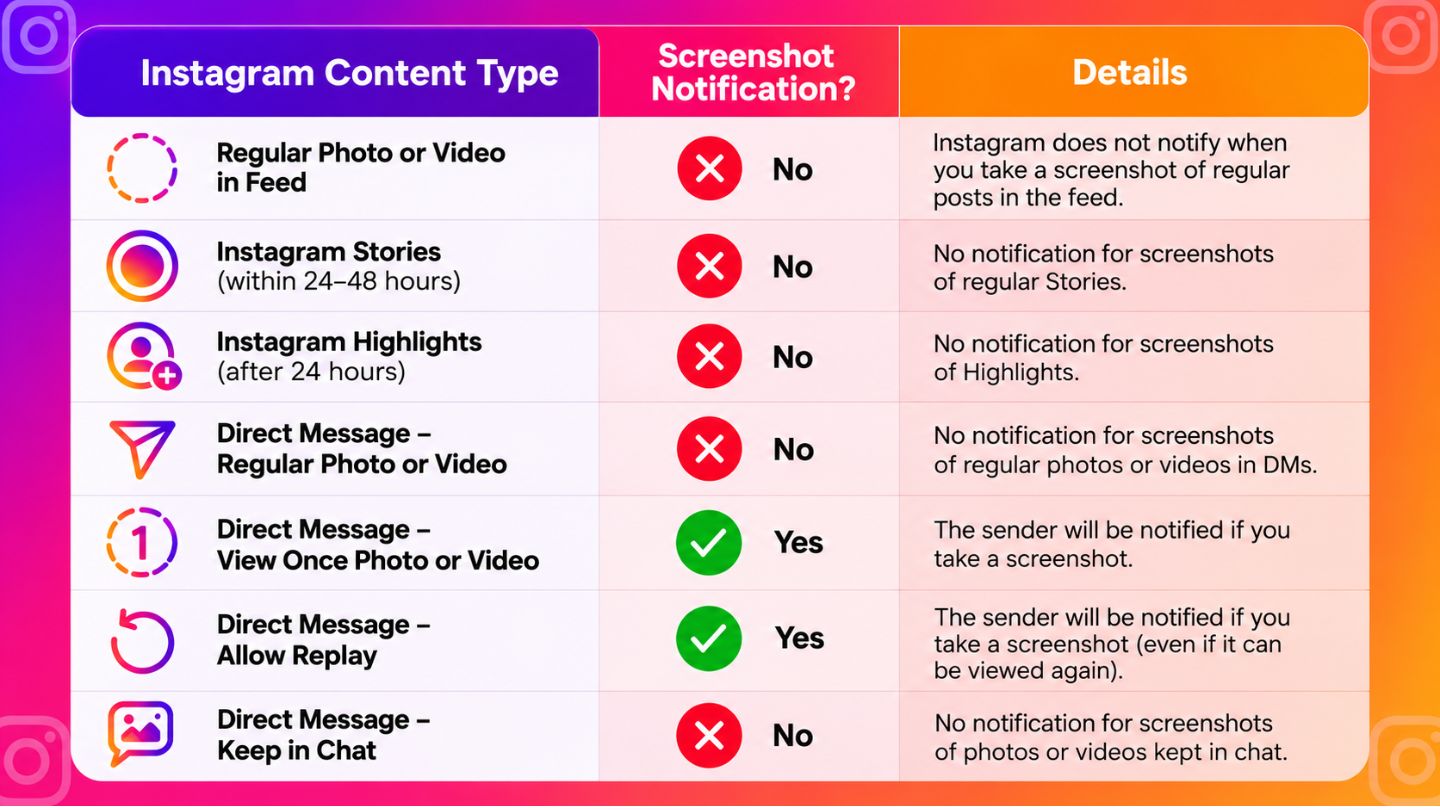
Here's the quick answer on Instagram screenshot notifications. Instagram doesn't notify anyone when you screenshot a feed post, Reel, Story, Highlight, profile or ordinary chat. The exception is disappearing photos and videos in DMs (View Once and Allow Replay) and Instants. On current app versions, Instagram blocks screenshots of those instead of letting them through.
This guide covers each content type so you know exactly what happens, and why so many people still believe Instagram reports every screenshot.
Key Takeaways
- Instagram doesn't notify users when you screenshot feed posts, Reels, Stories, Highlights or profile pages.
- Screenshots of regular DMs (text, shared posts, permanent photos or videos) don't trigger a notification.
- Disappearing photos and videos sent with View Once or Allow Replay are protected. Instagram now blocks screenshots of them in the app.
- Instants, Meta's 2026 disappearing-photo feature, can't be screenshotted or recorded either.
- Screenshots don't appear as a metric in Instagram Insights. Saves, shares and replies are what creators can measure.
- Much of the confusion comes from a 2018 Story test and from Snapchat, which does send screenshot alerts.
Quick Answer: When Does Instagram Notify?
Screenshotting Instagram Posts: The Official Answer
Start with the most common question. When you screenshot someone's photo, video, carousel or Reel from their feed, Instagram doesn't notify them. You can capture content from public profiles or accounts you follow without the creator knowing.
This lets people save inspiration, information and entertainment freely. Whether it's a home decor idea or a friend's post you want to show someone, the platform treats it as personal curation rather than something that needs an alert.
From a creator's point of view, other metrics matter far more. Reach, saves and shares say much more about performance. Understanding what accounts reached mean on Instagram clarifies how many unique users actually see your content. Screenshots don't show up in that number or anywhere in Insights.
If you only want to come back to a post, Instagram's Save button is often better than a screenshot. It keeps the original caption, the creator's credit and any later edits.
The Nuances of Instagram Stories
Stories feel more layered, but the outcome is the same. In 2018, Instagram briefly tested notifying people when someone screenshotted their Story. The test ended and the feature was never rolled out.
Today, Instagram doesn't notify users when you screenshot their Stories. You can capture a photo or video Story without the account holder getting an alert. However, viewing and screenshotting are two separate things. The creator can still see that you viewed the Story in its viewer list. If you later mention a very specific detail, they might guess, but Instagram itself gives no confirmation.
For businesses tracking Story performance, screenshots aren't in the analytics. Replies, shares and sticker taps are. When weighing Instagram likes, saves, and shares, and which one matters most, saves and shares usually signal stronger interest than passive views.
What about Highlights?
Highlights follow the same rule as Stories: no screenshot notification. If the Story inside the Highlight is less than 48 hours old, your view can still appear in its viewer list. Our guide on who can see your Instagram Highlights explains audience settings and viewer lists in detail.
Does Instagram Notify When You Screenshot a Chat?
No. Screenshots of ordinary Direct Message conversations don't notify the other person. That covers text messages, memes and posts shared from the feed, Reels sent in chat, GIFs, voice note screens, and photos or videos sent as normal attachments.
The key is how each piece of media was sent, not the fact that it's in a DM. A single chat can contain both regular messages and protected disappearing photos. Only the protected ones are treated differently.
If you've switched a chat into vanish mode, messages disappear when you leave the chat, and Instagram may tell the other person when a screenshot is taken in that mode. Follow any warning the app shows you there.
Disappearing Photos and Videos: The Real Exception
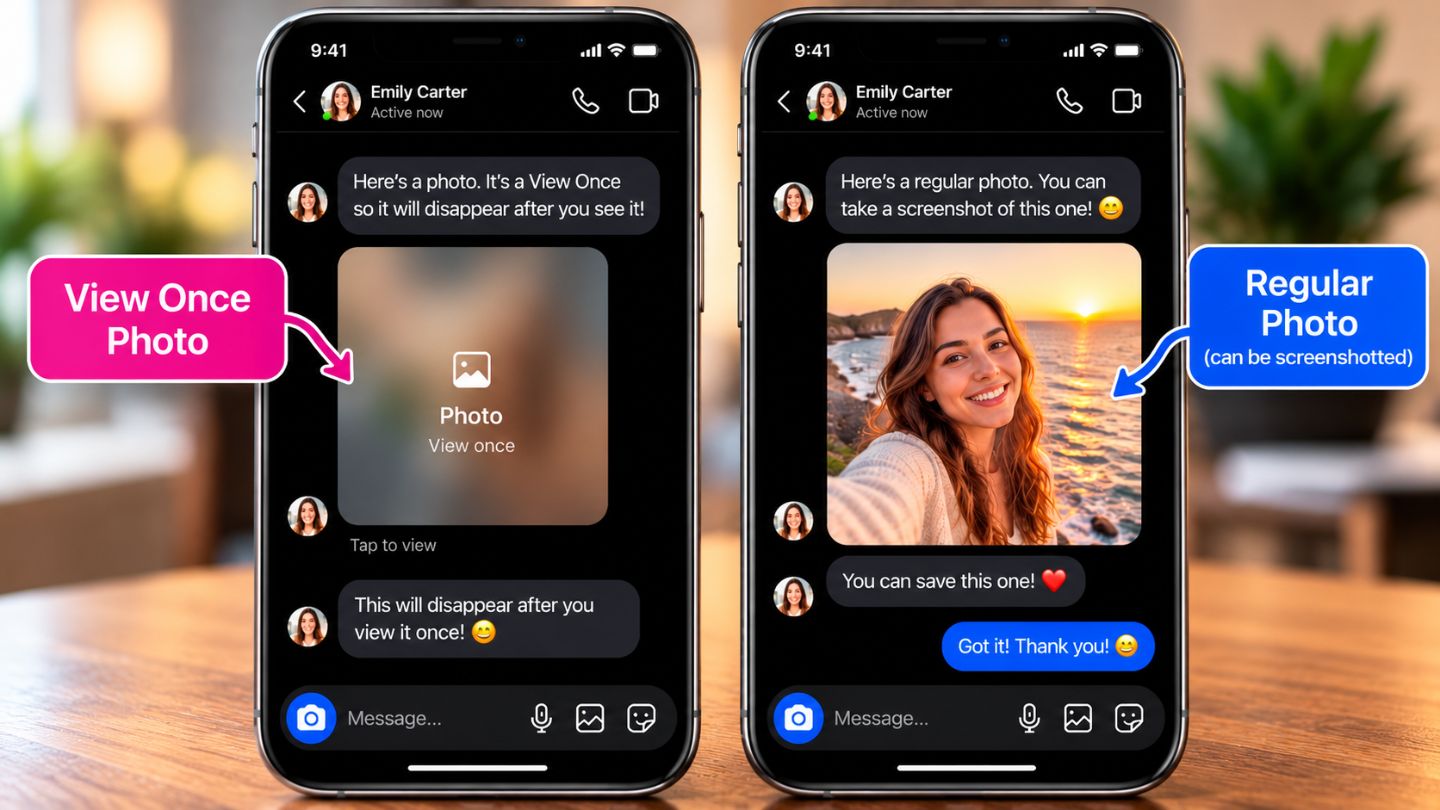
Photos and videos taken with the in-chat camera and sent with View once or Allow replay get extra protection. In October 2024, Meta announced that Instagram would no longer let people screenshot or screen record this media, and that it can't be opened on the web version of Instagram. Meta's announcement explains the change.
Before that, Instagram let the screenshot happen and showed the sender a small screenshot indicator next to the message. You may still see that described in older articles. On updated apps, the screenshot is usually blocked or comes out black instead. In both cases, the sender's choice is respected.
If you need a lasting copy, ask the sender to resend it as a regular photo. Our guide on how to save View Once on Instagram walks through that.
Does Screenshotting an Instagram Instant Notify the Person?
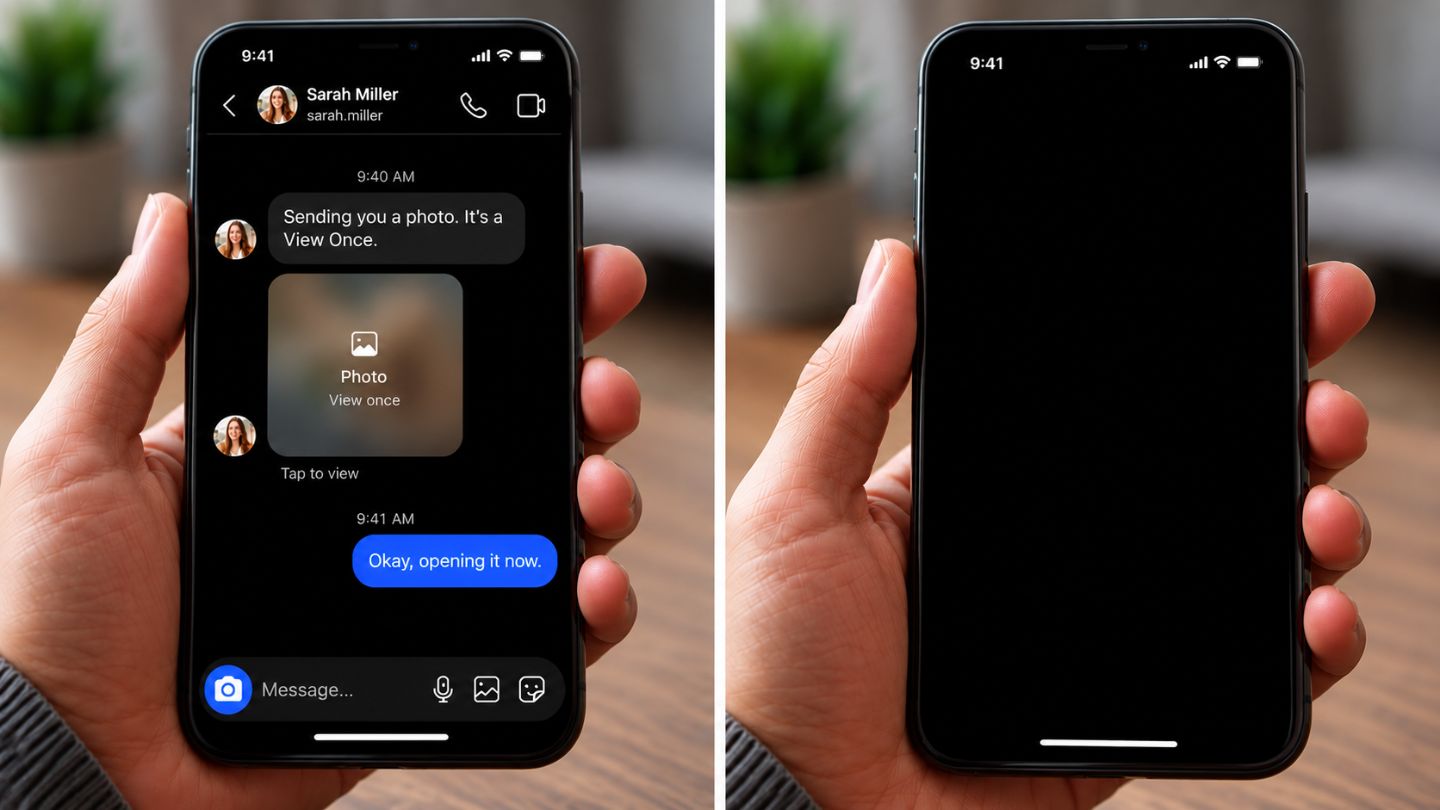
Instants can't be screenshotted at all. Meta launched Instants in 2026 as a way to share quick photos that disappear once viewed, and it states that people can't screenshot or record Instants shared with them. Because the capture is prevented, there's nothing to notify. Meta's Instants announcement has the details.
Why Is Instagram Not Allowing Screenshots?
If a screenshot fails or comes out black, check what you were viewing:
- View Once, Allow Replay or an Instant: the block is intentional.
- Vanish mode chat: follow the warning shown in the chat.
- Ordinary posts and other apps fail too: the cause is likely your device, such as a work profile, parental controls or low storage.
A blocked screenshot on protected media doesn't mean every Instagram post now has screenshot alerts. For more detail, see our guide to why Instagram blocks screenshots on certain content.
Why Do These Rumors Persist?
The belief that Instagram reports every screenshot keeps circulating. One reason is the 2018 Story test, which left a lasting impression even after it ended. Another is Snapchat, where screenshot alerts are standard, so people assume the same rules apply everywhere. The old DM screenshot indicator, now largely replaced by blocking, adds to the mix.
Instagram also updates privacy settings, recommendations and analytics often, which makes it hard to separate current facts from outdated advice. Worries about tracking spread beyond screenshots too. Questions like how to see who unfollowed you on Instagram come up whenever engagement changes, and Instagram doesn't send unfollow alerts either. These grey areas fuel myths about hidden notifications.
Navigating Social Media with Confidence
Knowing the screenshot rules removes needless anxiety. You can save ideas from posts and Stories without worrying about alerts, and you know why some DM photos can't be captured.
No notification doesn't mean free to reuse, though. Ask permission before reposting someone's photo, especially personal content, and credit creators when you share their work. A screenshot also loses the caption and source, so linking to the original is often better.
For creators and businesses, knowing what Instagram measures helps you plan. Screenshots aren't part of Insights. Saves, shares, comments and profile visits are, and they're what you should optimise for.
Final Thoughts
Instagram doesn't notify users when you screenshot feed posts, Reels, Stories, Highlights, profiles or regular direct messages. Disappearing photos and videos sent with View Once or Allow Replay, and Instants, are the exception: on current app versions Instagram blocks screenshots of them rather than sending an alert. Knowing this removes the confusion and lets you use the platform with confidence, while still respecting content ownership.
At The Ocean Marketing, we help brands handle platform details like these through social media marketing that drives measurable growth. From engagement metrics to content performance, our team keeps your social presence aligned with how people actually use the app. You can also request a free SEO audit to see how your wider digital presence is performing.
Frequently Asked Questions
Can someone see if I screenshot their profile picture?
No. Profile pages and profile pictures don't trigger notifications.
Does Instagram notify when you screenshot a Reel sent in DMs?
No. A shared Reel is ordinary content, not disappearing media.
Does screen recording work differently from screenshots?
The rules are similar. Our guide on whether Instagram detects screen recording covers it in detail.
Can I screenshot a close friend's Story without them knowing?
Yes. Close Friends Stories follow the same rule as other Stories, though your view still appears in their viewer list.